Tool limitations and user responsibilities
SAFETY NOTE
Observing these limitations is critical for producing reliable safety analysis results.
Model requirements
The accuracy and precision of data used by the tool is crucial for generating valid safety analysis. The tool cannot draw reliable conclusions about system safety without trustworthy simulation results.
Monotonicity of abstracted functions
The model abstraction method is limited to monotonic functions. Selection of landmarks that define qualitative values is crucial for correctly detecting system effects.
Consider a function f computing output variable y from n input variables x₁,…,xₙ so that y = f(x₁,…,xₙ). Define envelope functions ε⁻ and ε⁺ where ε⁻ < f < ε⁺ is always true [Struss2002].
- For qualitative values where function
fis monotonic: majoring and minoring values offcan be found using envelope function evaluation at landmarks - For qualitative values where function
fis not monotonic: finding majoring and minoring values using envelope functions at landmarks is not possible
Since a qualitative model uses the values of a fine-grain (usually quantitative) model at the defined landmarks, it is crucial that these landmarks are selected in a manner that the output variable y always behave monotonically at the abstracted model qualitative values. To overcome the problem seen on the left side on the figure below, the solution is to add new landmarks and use more qualitative values for the model abstraction.
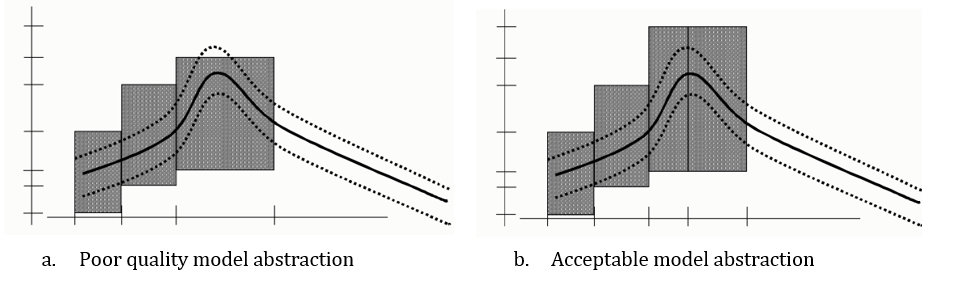
SAFETY NOTE
- Landmarks must be selected so that output variable
yalways behaves monotonically at abstracted model qualitative values. Add new landmarks and use more qualitative values when monotonicity is violated. - The same landmarks are used for the nominal (i.e. with no failure) and system under failure. Hence it is assumed that failures do not impact the monotonicity regions of the output functions.
When multiple output variables are considered and a qualitative input can lead to multiple output qualitative values, a cross product is generated. This can lead to spurious solutions, which is a known limitation of the approach.
Steady state assumption
The analysis approach relies on systems behaving in steady state. Simulation results must correspond to steady state behavior.
SAFETY NOTE
The user is responsible to predict system dynamics regarding different failure modes and set up simulation tools to provide appropriate data according to this assumption.
Long simulation times can indicate that a system is not in steady state. The tool can stop long simulations exceeding a predefined threshold.
Failure mode simulation
It is not guaranteed that a faulty model can be simulated. Depending on system architecture and the considered failure mode, simulation convergence may be difficult or impossible to reach.
The tool uses a timer to detect and stop simulations that do not converge in reasonable time. At analysis end, users are informed of all stopped/crashed simulations.
Individual solver configuration changes may allow failed failure mode simulations to succeed.
User responsibilities for model accuracy and simulation results
Accuracy and precision of data used by the tool is crucial for generating valid system analysis. The tool cannot draw reliable conclusions about system safety without trustworthy simulation results.
Simulations launched by the tool rely on solver setup defined by the user in their model/simulation environment.
SAFETY NOTE
To ensure result trustworthiness, users must:
- Ensure the model is detailed enough to describe physical effects to be studied
- Check solver setup and confirm it is suited for simulating the system with all failure modes to be studied
- Ensure confidence in the simulation solver and its results, and accept any residual risk that inaccurate simulation results may lead to incorrect analysis
- Review and approve the produced safety report (safety expert responsibility)
Numeric limits
The tool limits numeric inputs and outputs for simulations to the range ±7.9228×10²⁸. Values below or above are replaced with the respective min or max value from this range.
Analysis limitations
Failure modes database
The failure modes database might not consider all case-specific requirements. These cases are highlighted in the reports wherever relevant.
Report validation
SAFETY NOTE
Unless the tool’s functionality has been formally qualified or certified for the specific user context, no guarantees can be given regarding the correctness or completeness of the resulting report. In such cases, the complete safety report must be reviewed by a qualified safety expert. If a particular functionality is qualified or certified and the tool is used according to the intended workflow, additional review is only required if specified by the workflow or relevant standards.
Tool capabilities vs. limitations
What Paitron can do
- Automate failure injection and simulation for detected failure modes
- Abstract simulation results into qualitative behavior descriptions
- Detect effect occurrences based on formalized effect definitions
- Generate safety reports compliant with the selected standard
- Integrate with multiple simulation environments
- Process BOM data for extracting components data
What users must provide
- Accurate simulation models representing system behavior
- Proper solver configuration
- Formal definitions of scenarios and effects
- Domain definitions with appropriate landmarks for monotonic abstraction
- Validation and approval of generated reports
Responsibility matrix
| Task | Paitron | User |
|---|---|---|
| Failure mode injection | ✓ | |
| Simulation execution | ✓ | |
| Effect detection (formalized effects) | ✓ | |
| Model accuracy verification | ✓ | |
| Solver configuration | ✓ | |
| Landmark selection for domains | ✓ | |
| Effect formalization | ✓ | |
| Report validation and approval | ✓ | |
| Safety assessment | ✓ |
For questions about tool capabilities or limitations, contact support@modelwise.ai.