Read before first use
Before using Paitron for the first time, please take a moment to read through this section carefully. Since Paitron is designed for use in safety-critical applications, understanding its approach to analysis and - in particular - its limitations is essential for applying the results correctly.
If you have any questions about any of the concepts covered here, our support team is always happy to help.
Mode of operation
Paitron performs automated model-based safety analysis using deterministic simulatable models.
Workflow
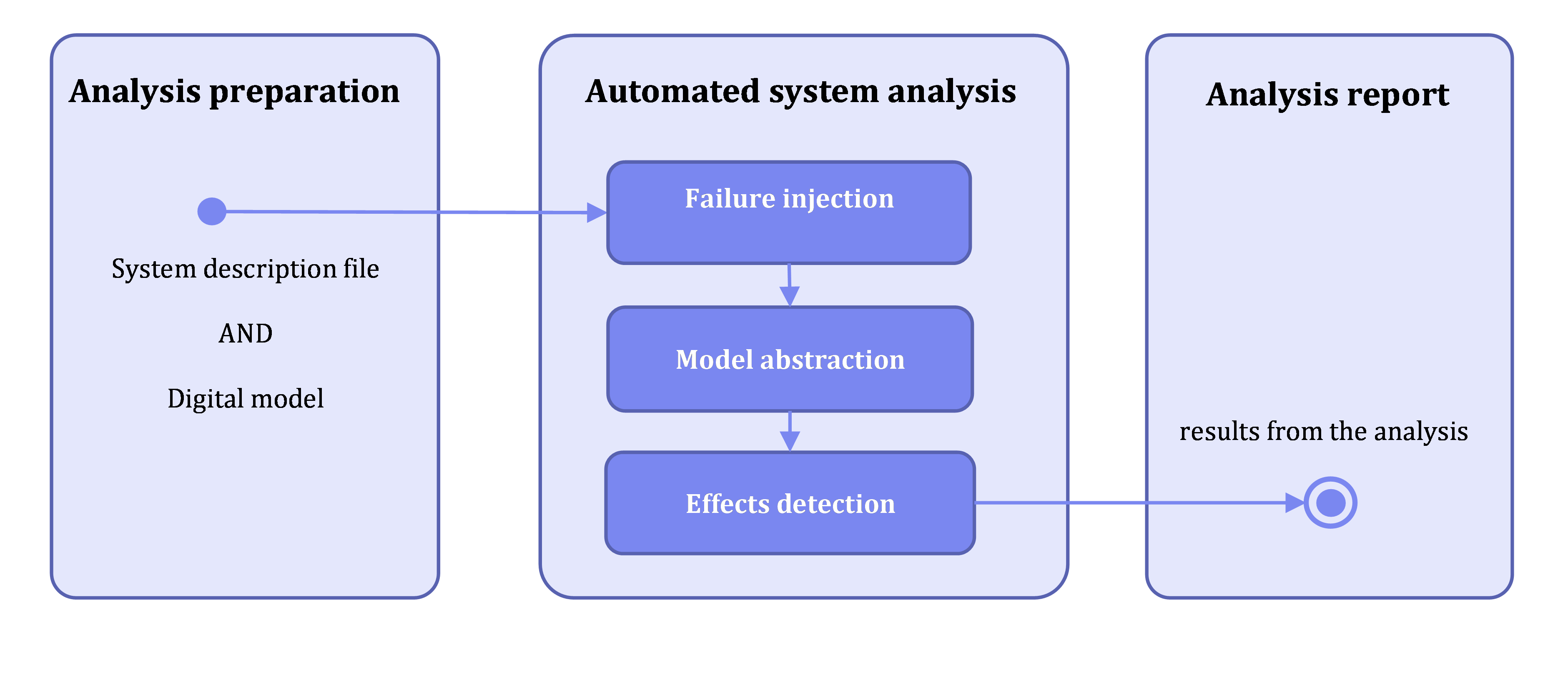
The analysis workflow consists of the following steps:
- Analysis preparation: Create a project and formal description of the studied system - the structured definition of variables, domains, scenarios, and effects that are entered via the system editor and stored in the system description file
- Failure injection: Inject detected failure modes into the system model (if not already performed or if configuration requires fresh injection)
- Model abstraction: Simulate individual faulty models and abstract results (only executed when previous results are unavailable or configuration prohibits reusing)
- Effects detection: Detect effect occurrence based on the qualitative models of the system with injected failure mode
- Analysis report: Preparation of the safety analysis report
Failure sources
Failure rates and mode indicated by various industrial and military sources can be considered in analyses. See Failure sources for more information
Model abstraction
The tool applies model abstraction to enable mathematically complete analysis of system behavior. Model abstraction reduces numeric (continuous) values to qualitative distinctions, focusing on meaningful value changes only.
For electric circuits, knowing whether voltage exceeds a threshold to flip a transistor may be sufficient instead of using the exact voltage. Paitron relies on a method referred to as model abstraction which allows to establish qualitative models from numerical models [Struss2002].
Qualitative values are defined using landmarks - numeric values that define boundaries between qualitative regions.
Accessing the customer resource portal
The customer resource portal provides access to the user manual, tutorials, and advanced topics. You can open the portal directly from the tool. Additionally, you can generate an authentication token there to connect to the online platform.

Limitations
A high-level overview of the most important tool limitations is available at Tool limitations and user responsibilities.
SAFETY NOTE
Strict adherence to the limitations and usage guides is essential to achieve reliable and valid safety analysis results. The tool does not replace expert judgment; unless the tool’s functionality has been formally qualified or certified for the intended use, all results must be reviewed and approved by a qualified safety expert. Any deviation from the recommended workflow or limitations (as described in the whole documentation) may compromise the integrity of the analysis and the achievement of functional safety requirements.