Functional description
Introduction
Software solution for (partially) automated model-based functional safety analysis exploiting logical or physical models. The current version supports both Failure Mode Effects Analysis (FMEA) and Failure Mode Effects and Diagnostics Analysis (FMEDA). The results of the analyses are stored in proprietary file format and can be exported to Excel.
Techniques from model-based and qualitative reasoning (subfields of automated reasoning in artificial intelligence) are applied. Model-based means that the reasoning is based on formally represented models of the system being developed, while qualitative characterizes the type of models that are based on systematic abstractions of system behavior.
Intended use
Paitron is a software application that assists with (partially) automated, model-based functional safety analyses of technical equipment.
It is intended to:
- Support preparation of safety analysis artifacts such as FMEA and FMEDA.
- Produce analysis results that serve as a source document for a final safety analysis performed and approved by a qualified human expert.
Paitron does not:
- Replace expert engineering judgment or independent review.
- Guarantee that outputs comply with every possible standardization requirement or project-specific rule set.
- Provide a certified/qualified safety assessment unless the user has performed the required qualification/certification for their specific intended use.
Features
Automation of functional safety analysis, especially failure propagation and failure mode and effect analysis (FMEA) is achieved with the following workflow:
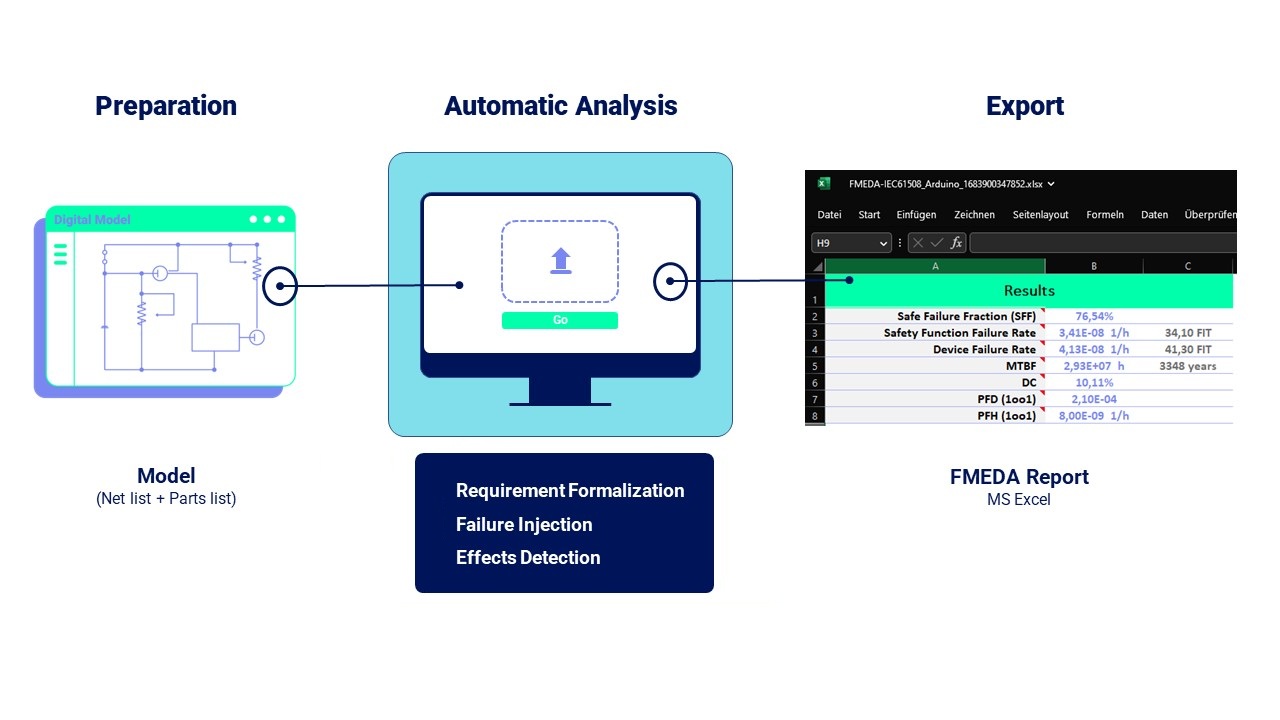
At a high level, Paitron performs the following workflow:
- Analysis preparation: user sets up a project and formal description of the system under study.
- Failure injection: the software generates (or applies) failure modes to the system model.
- Model abstraction and simulation: the software runs simulations (via configured simulation tools where applicable) and abstracts results into a qualitative representation.
- Effects detection: the software evaluates whether defined effects/conditions can occur for the simulated failure modes.
- Reporting: the software generates a safety analysis (e.g. FMEA/FMEDA-style report); certain entries may require manual completion/review.
For more details on the mode of operation, see Read before first use.
Inputs and outputs
Typical inputs (provided/configured by the user)
- System design/model data (e.g., circuit design, netlists, simulation models) and project configuration.
- Optional BOM information for component matching and failure-rate/mode association.
- Formalization inputs such as terminals, domains/landmarks, scenarios, and effect definitions.
- Simulation solver/tool configuration used to produce simulation results.
Outputs
- Analysis results saved in a proprietary format.
- Export of analysis tables/reports to Microsoft Excel (when configured/available).
Outputs require plausibility and content checks (completeness/correctness) by a technically qualified person before use in safety-related decision-making.
Dependencies
Paitron may interface with third-party simulation tools. Supported environments and prerequisites are listed in System requirements.
Third-party components and licenses are listed in Third-party software and libraries.
Limitations
The tool should be used in accordance to the usage guides and limitations for producing reliable safety analysis results.